2026-2027 Parent Portal information
*Important* please read further if this applies to you for the 2026-2027 school year
1. If your child has moved to a different School Board, please follow the instructions below to reset your parent portal account.
Moving from UGDSB to WCDSB, CSV,SRG you will need to follow these instructions:
- Log into your Parent portal account. Select the Returning UGDSB Parent login button. Ensure you remember your username/password.
-
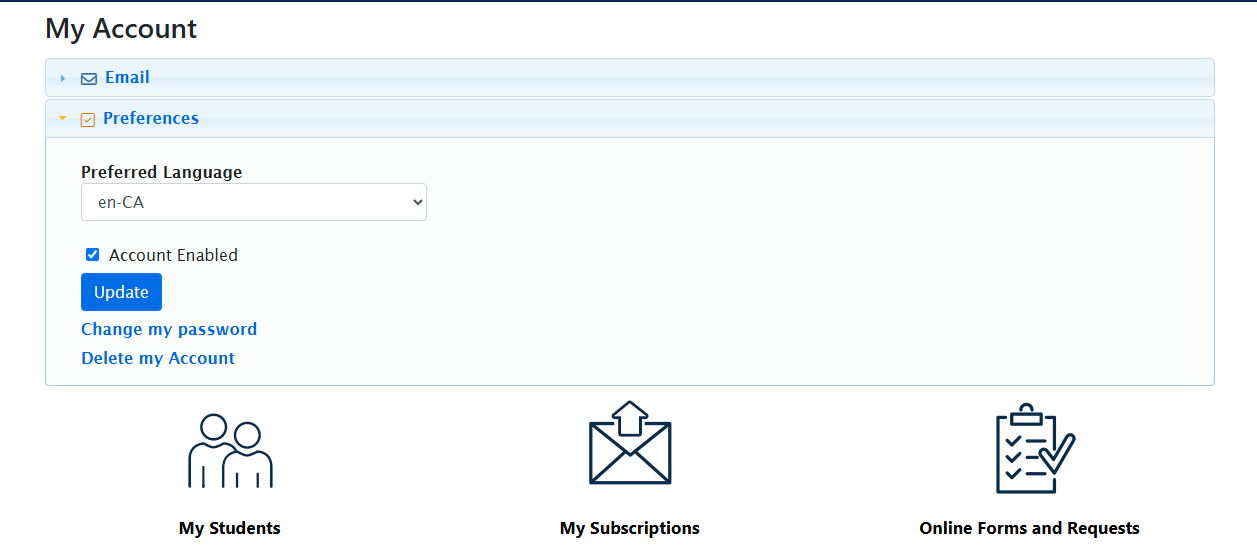
From the Parent Menu select “My Account”.
-
Expand “Preferences” to delete your account (see image below)

- Once your account has been deleted, you can go back to the home page and create a new account. Click here
2. If you have children enrolled in more than one School Board, click here to for instructions on how to access your child's information.
- For parents with students attending UGDSB please review the procedures on our page. Click here
- For parents with students attending WCDSB, CSV,SRG you must create a new parent portal account with an alternate email address. (This is required)
- Please ensure the emails in steps 1 and 2 are different as they cannot be the same. You will not be able to see all students on one email profile.
- Once the newly created account is created you should notify the school and have them update the email address on the student information record. This is important
- Parents who wish to receive delays and cancellations to their mobile device can download the delays app. This will give alerts on your phone vs an email notification. Please follow the instructions here